
No more crowded waiting rooms
Customers join the line from their phone or a kiosk and wait wherever they like. You call them from the counter, and a screen shows who is next.
7-day free trial · No credit card required · From $5/month, billed annually
Everything a busy counter needs, and nothing it does not
QueR is built for small service centres that serve walk-in customers, from about 10 to 250 visitors a day.
Join from a phone
People crowd the waiting room just to keep their place.
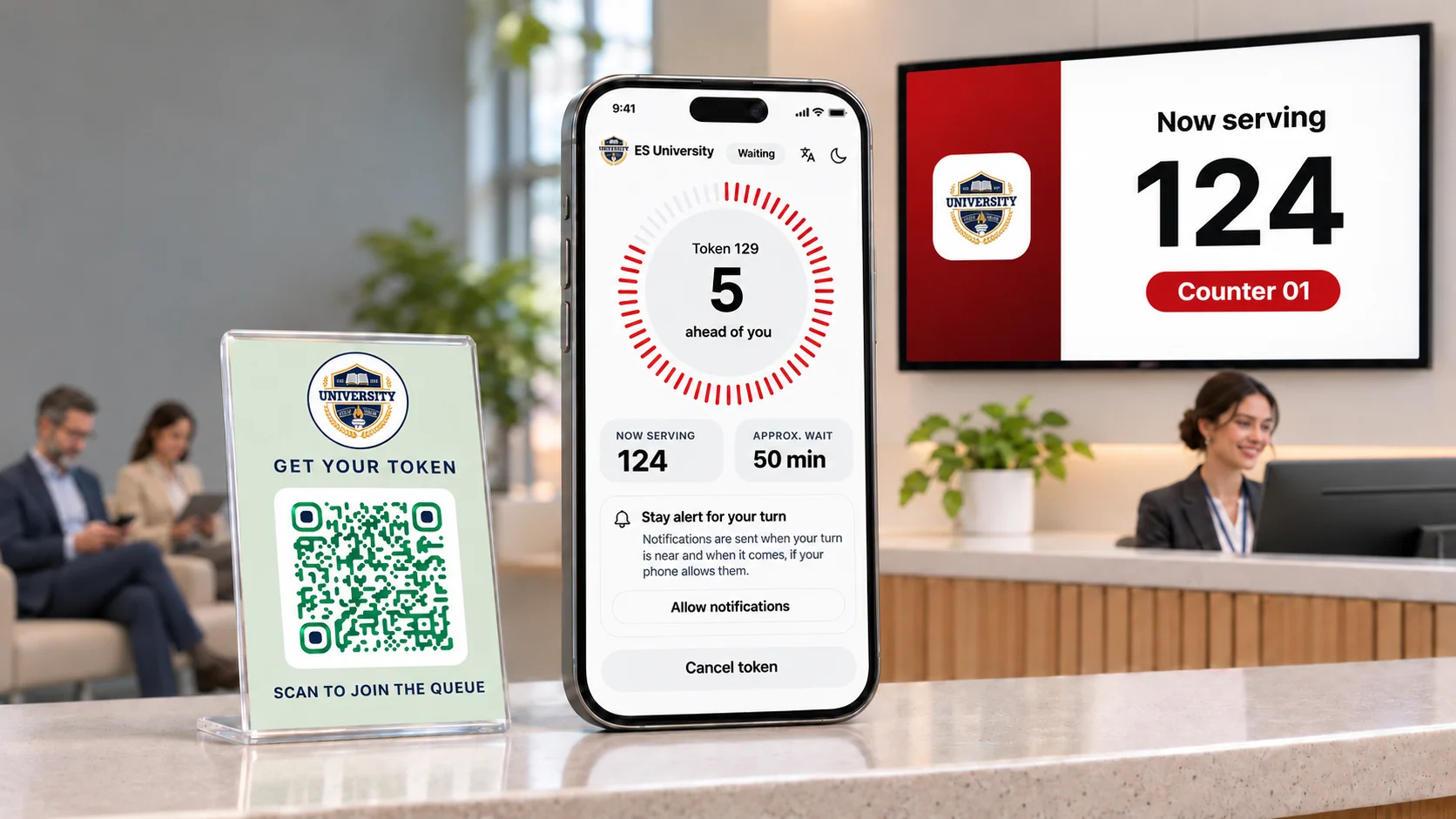
Customers scan your QR code and get a numbered token in their phone’s browser. There is nothing to install, and the QR code prints as a ready-made sign.
A kiosk for walk-ups
Not everyone wants to scan a code.
A kiosk at the door shows one large Get token button and prints a ticket on a 58 mm or 80 mm roll. The ticket carries a QR code, so customers can follow their place on their phone too.
Know when it is your turn
Customers keep asking how long it will be.
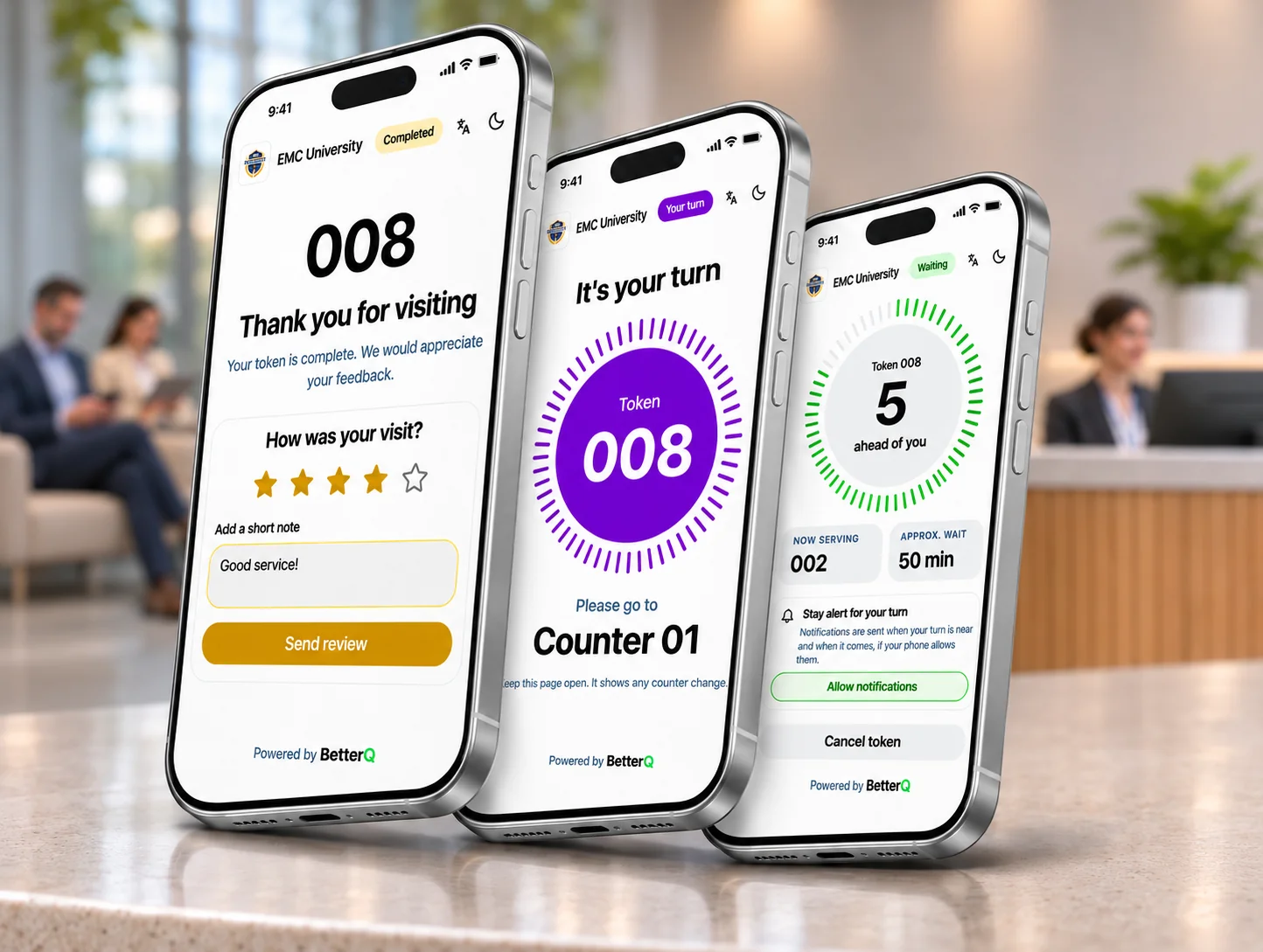
The token page updates live with the number being served, how many are ahead and the estimated wait. Where their phone allows it, customers also get an alert when their turn is near and when it arrives.
A live display for the room
Nobody can see who is next.
Show the numbers being served on any TV or screen with a browser. Calls can be read aloud in your language or the customer’s, and Professional and Business plans can show your own promotional images.
A calm counter
Staff lose track of who is next.
One button, Call Next, calls the customer who has waited longest. Staff can also call a particular customer, put a token back in the line, take a break, mark a no-show and keep a note on each customer.
Know who you are serving
You only want to ask for what you need.
Ask customers for a name, phone number, email or any other detail, and the representative sees the answers when they call that customer. An administrator can also add someone to the line by hand.
See how you are doing
You cannot improve what you cannot see.
Reports on waits, service times, busy hours and customers who left, downloadable as CSV or Excel files. Customers can rate their visit from one to five stars, and Business plans keep an audit log of changes.
Run it your way
Every business keeps different hours.
Set opening hours for each weekday, and switch token issuing on or off at any time. Staff keep serving everyone already in line. Add your logo and pick a colour theme for your sign, kiosk and customers’ phones.
How it works
- Customers join
They scan the QR code or tap the kiosk and get a numbered token.
- Customers wait anywhere
Their phone shows their place and estimated wait, and the display shows the line.
- Staff call the next customer
One button calls them. The number appears on the display and on their phone.
Speaks your customers’ language
QueR works in eight languages, for your team and for the people you serve.
- English
- 中文
- Español
- Português
- 日本語
- Français
- Deutsch
- 한국어
- Staff screens
- Every team member picks their own language at the top of the screen.
- Kiosk and customers’ phones
- Customers choose from your main language and up to four more that you switch on. Your visitor form is written in each of them.
- Voice announcements
- Calls are read aloud in your main language or the customer’s, as long as the display’s computer has a voice for it.
- Alerts and emails
- Phone alerts reach customers in the language they chose. Emails to your team use your main language.
Simple pricing for busy counters
Every plan starts with a 7-day free trial. No credit card required.
Solo
Professional
RecommendedBusiness
* Counters are also limited to one for every four daily tokens, so Professional allows up to 25 and Business allows up to 62.
Compare plans
| Feature | Solo | Professional | Business |
|---|---|---|---|
| Billed monthly | $7/mo | $16/mo | $32/mo |
| Billed annually | $5/mo | $12/mo | $24/mo |
| Daily token limit | 50 | 100 | 250 |
| Counters | 2 | Unlimited* | Unlimited* |
| Staff accounts | Unlimited | Unlimited | Unlimited |
| Waiting room screens | 1 | Unlimited | Unlimited |
| Visitor forms with custom fields | Up to 2 fields | Up to 5 fields | Unlimited fields |
| Data retention | 3 days | 7 days | 14 days |
| On every plan | |||
| Single location | Included | Included | Included |
| Multi-language support for visitor forms | Included | Included | Included |
| Voice announcements for the waiting area | Included | Included | Included |
| Self-service kiosks and ticket printers | Included | Included | Included |
| Automated visitor feedback collection | Included | Included | Included |
| Analytics and reports | Included | Included | Included |
| Custom theming | Included | Included | Included |
| Plan differences | |||
| Promotional branding on waiting room screens | Not included | Included | Included |
| Audit logs | Not included | Not included | Included |
| Dedicated account manager | Not included | Not included | Included |
| Available in BetterQ | |||
| Multiple locations | Not part of QueR — try BetterQ | ||
| Service category based routing | Not part of QueR — try BetterQ | ||
| Skill based routing | Not part of QueR — try BetterQ | ||
| Tiers (VIP / Priority / Regular) | Not part of QueR — try BetterQ | ||
* Counters are also limited to one for every four daily tokens, so Professional allows up to 25 and Business allows up to 62.
Frequently asked questions
Can’t find your answer? Email us at hello@office.betterq.app.
How does the free trial work?
Every plan starts with a 7-day free trial, and no credit card is needed to begin. Add a card before the trial ends to keep using QueR. You are not charged until the trial ends.
Do my customers need to install an app?
No. Customers scan your QR code or use the kiosk, and their token opens as a web page in their phone’s browser.
Will customers get alerts on their phone?
Where their phone and browser allow it, QueR sends an alert when a customer’s turn is near and another when it arrives. Browser tabs on an iPhone cannot receive these alerts, so the token page asks customers to keep it open. The page itself always updates live.
What counts towards the daily token limit?
Every token you issue counts, except one the customer cancels. Customers who do not show up still count, and so does a token a team member removes from the line. The count starts again at midnight in your time zone. When you reach the limit, the QR code and the kiosk tell customers that no more tokens are available today, and your team keeps serving everyone already in line.
Do I need to buy special hardware?
No. The kiosk and the live display run in a web browser, so any computer, tablet or screen with a browser will do. You only need a receipt printer if you want printed tickets. QueR supports 58 mm and 80 mm paper rolls.
How do I sign in?
Every business has its own sign-in page. Choose Sign in at the top of this page, enter your email, and we send you a link to the sign-in page of each business you belong to.
How long is my data kept?
Token history is kept for 3 days on Solo, 7 days on Professional and 14 days on Business, then deleted automatically each day. Reports only cover the data that is kept, so download what you need before it goes.
Can I change or cancel my plan?
You can move to a larger plan at any time from the Billing page, and you can cancel there too. Your account stays active until the end of the period you have paid for. To move to a smaller plan, contact us.
What happens if a payment fails?
We email your administrator reminders first. If a renewal is still unpaid 15 days after it failed, or no card has been added by the fourth day after the trial ends, the account is suspended. Seven days after that it is deleted for good and cannot be restored. Paying from the Billing page lifts a suspension. Read the full terms
Do you give refunds?
No. Every payment is final and non-refundable, so use the 7-day free trial to be sure QueR suits you. Read the Refund Policy
How is my data protected?
Your data is encrypted in transit and at rest, and each business’s data is kept separate from every other business’s. Access is role-based, so people see only what their role allows. Business plans also keep an audit log of changes.
What if I need more than QueR offers?
QueR is for one waiting line at one location. If you need appointments, several service lines, service category or skill based routing, VIP and priority tiers, or more locations, try BetterQ. See BetterQ plans
Try QueR free for 7 days
Set up your line in minutes. No credit card required.